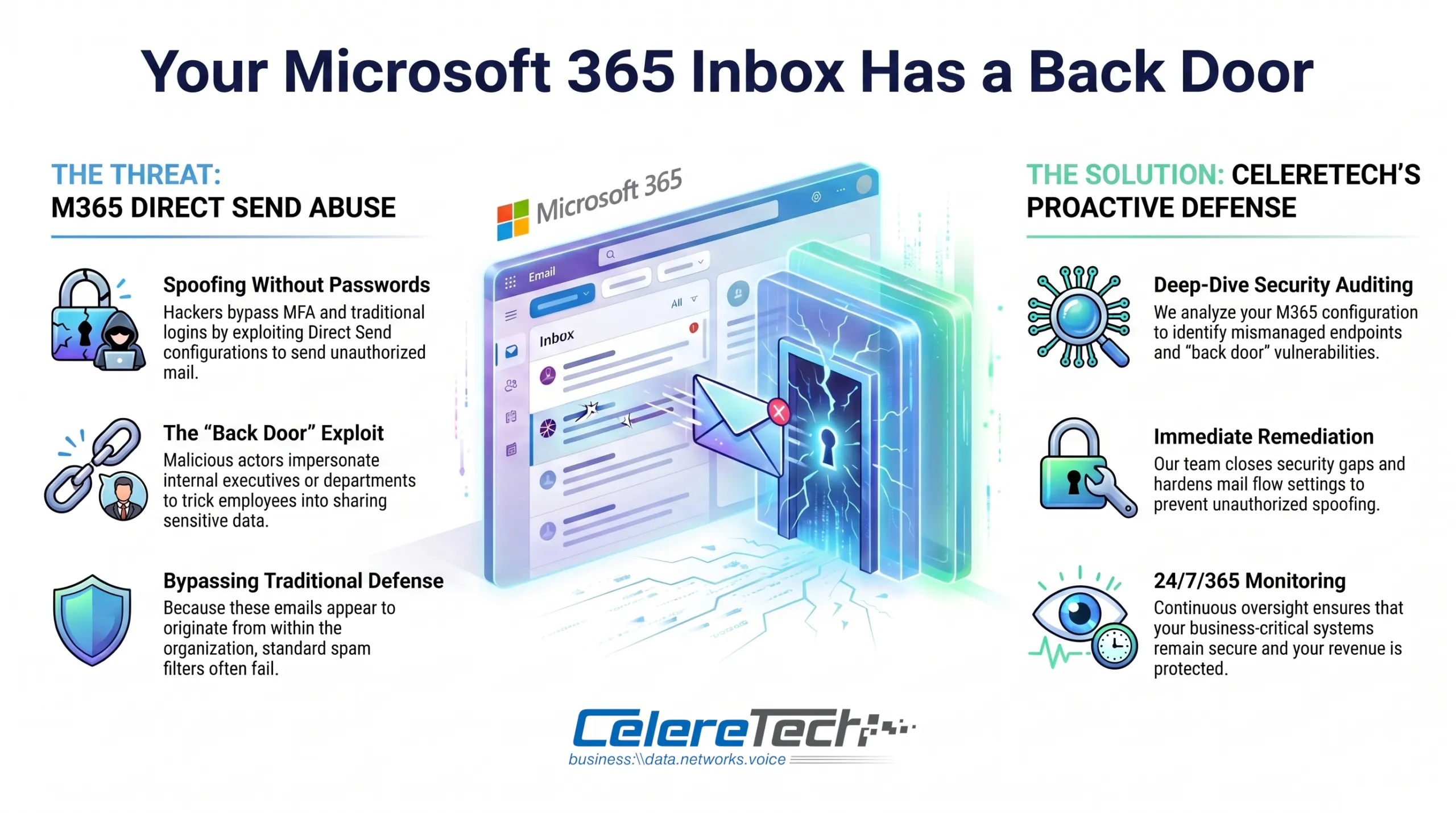
If your organization runs Microsoft 365, there’s a high probability that right now, an attacker could send an email to anyone in your company that appears to come from your CEO, your HR department, or your IT team — without ever compromising a single account or guessing a single password.
This isn’t a theoretical risk. It’s an active, documented, and growing attack campaign that security firms including Varonis, Mimecast, Proofpoint, Barracuda, Cisco Talos, and IRONSCALES have all independently confirmed as one of the most significant email threats of 2025. The attack vector is called Microsoft 365 Direct Send abuse, and the vast majority of organizations running Microsoft 365 remain exposed to it right now.
This article explains what Direct Send is, how attackers are exploiting it, what the real-world consequences look like, and exactly what your IT team needs to do to close the door.
What Is Microsoft 365 Direct Send?
Direct Send is a legitimate, built-in feature of Microsoft 365’s Exchange Online service, designed to solve a practical problem: office devices like multifunction printers, copiers, scanners, and older line-of-business applications often need to send emails internally — scan-to-email notifications, backup alerts, automated reports — but these legacy devices typically can’t support modern authentication protocols.
Direct Send solves this by allowing devices and applications to send email directly to internal recipients by connecting to the organization’s Exchange Online smart host over port 25, without requiring any username, password, or authentication token. The smart host address follows a predictable format — yourtenantname.mail.protection.outlook.com — which is also, notably, the same address as your organization’s MX record, publicly discoverable by anyone.
For its intended purpose, Direct Send is a reasonable convenience feature. The problem is that it’s enabled by default for every Microsoft 365 tenant, and the lack of authentication requirement that makes it convenient for printers also makes it a perfect attack vector for threat actors.
How Attackers Are Exploiting It
An attacker needs only two pieces of information: your organization’s domain name, and at least one valid internal email address (easily obtained through LinkedIn, the company website, or previous data breaches).
With that information, the attacker connects directly to your Exchange Online smart host over port 25 and sends a spoofed email that can claim to come from any address at your domain — including the CEO, HR, IT support, or finance. Varonis researchers documented active campaigns in 2025 using Direct Send to deliver spoofed “internal” emails with QR codes, credential-harvesting phishing pages, and malware-laced attachments.
The result: an email delivered directly to someone’s inbox that appears to have been sent by someone internal, from a completely external, unauthenticated source.
Why Standard Security Tools Don’t Catch It
This is where Direct Send abuse becomes particularly insidious. Organizations invest in email security tools — SPF, DKIM, DMARC, third-party email gateways, Microsoft Defender for Office 365 — specifically to block spoofing and phishing. Direct Send abuse undermines these controls:
- SPF validates that a sending IP is authorized to send on behalf of a domain. Because Direct Send routes through Microsoft’s own infrastructure, it can appear to pass SPF checks.
- DKIM cryptographically signs outbound email. Direct Send messages aren’t signed, but because they route through Microsoft servers, they can bypass the external-facing scrutiny applied to mail from unknown third-party servers.
- DMARC relies on SPF and DKIM alignment. When both fail, DMARC should block the message — but the internal routing characteristics of Direct Send can cause these messages to still reach the inbox or junk folder in many tenant configurations.
- Third-party email security gateways typically focus on filtering inbound mail from external sources. Because Direct Send routes through Microsoft’s trusted infrastructure, it can bypass these perimeter controls entirely.
- “External Sender” warning banners are often not added to these messages, because from Exchange Online’s perspective, the email is routed as an internal message.
The Real-World Consequences
- Credential harvesting via QR code phishing (“quishing”) — Spoofed internal emails appearing to come from HR, IT, or management, containing a PDF with a QR code directing the victim to a convincing fake Microsoft 365 login page.
- Account takeover and lateral phishing — Once credentials are stolen, the attacker can read confidential emails and documents, send further phishing messages from a now-legitimately-authenticated account, and access connected services like SharePoint, Teams, and OneDrive.
- Business Email Compromise (BEC) — Attackers use the internal trust established by a spoofed sender identity to execute financial fraud, typically by impersonating a CEO or CFO requesting urgent wire transfers or payroll data. According to FBI data covering October 2013 through December 2023, BEC scams resulted in exposed losses exceeding $55 billion globally.
- Malware delivery — In some campaigns, the payload is a malware-laced attachment delivered as a seemingly routine internal document.
Why Most Organizations Are Still Exposed
In April 2025, Microsoft acknowledged the abuse publicly and introduced a tenant-level setting called RejectDirectSend that allows administrators to block all unauthenticated Direct Send traffic. This setting is disabled by default, meaning every Microsoft 365 tenant set up before — and after — April 2025 remains vulnerable unless an administrator has explicitly enabled it. Most IT administrators and business owners simply don’t know the setting exists.
How to Close the Door: A Step-by-Step Remediation Guide
Closing the Direct Send vulnerability requires a deliberate, sequenced approach. Rushing to flip the toggle without preparation can break legitimate internal workflows.
Step 1: Audit your tenant for Direct Send usage
Before making any changes, identify whether any legitimate systems in your organization are currently using Direct Send — multifunction printers with scan-to-email, backup software notifications, monitoring platforms, or line-of-business applications.
Use the Historical Message Trace to generate a report of inbound email received without a connector over the last 90 days:
Start-HistoricalSearch -ReportTitle DirectSendMessages -StartDate 01/01/2026 -EndDate 03/31/2026 -ReportType ConnectorReport -ConnectorType NoConnector -Direction Received -NotifyAddress admin@yourdomain.comYou can also generate this from the Exchange Admin Center under Reports > Mail flow > Inbound messages. Organizations with a Defender for Office P2 subscription can use Threat Explorer and Advanced Hunting with a KQL query:
EmailEvents
| where Timestamp > ago(30d)
| where EmailDirection == 'Inbound' and Connectors == '' and isnotempty(SenderIPv4)
| project Timestamp, RecipientEmailAddress, SenderMailFromAddress, Subject, NetworkMessageId, EmailDirection, Connectors, SenderIPv4
Step 2: Migrate legitimate Direct Send users to authenticated alternatives
Every legitimate system identified in Step 1 needs to move to an authenticated sending method before you disable Direct Send:
- SMTP AUTH — For devices and applications that support modern authentication, configure a dedicated Microsoft 365 service account via SMTP AUTH on port 587.
- Third-party SMTP relay (e.g., SMTP2Go, SendGrid) — For legacy devices that can’t support Microsoft’s authentication requirements.
- Microsoft 365 connector with IP restriction — Where neither option is feasible, restrict Direct Send to specific, authorized IP addresses.
Step 3: Enable RejectDirectSend via Exchange Online PowerShell
Once all legitimate users are migrated, install the Exchange Online PowerShell module if needed:
Install-Module -Name ExchangeOnlineManagement -Force
Connect-ExchangeOnline
Check the current setting:
Get-OrganizationConfig | Select-Object Identity, RejectDirectSendEnable it:
Set-OrganizationConfig -RejectDirectSend $trueAllow approximately 30 minutes for the setting to propagate before testing. To confirm Direct Send is blocked, attempt an unauthenticated test send — a correctly configured tenant will return:
550 5.7.68 TenantInboundAttribution; Direct Send not allowed for this organization from unauthorized sources.Step 4: Harden the rest of your email authentication stack
Disabling Direct Send is one layer of a complete posture. Also verify:
- SPF is current and authorizes all legitimate sending services
- DKIM signing is enabled for your domain and any third-party sending services
- DMARC policy has a path from
p=nonetop=quarantinetop=reject - Conditional Access restricts legacy authentication paths that don’t support MFA
- User awareness training covers unexpected credential requests, QR codes in attachments, and verifying unusual requests through a second channel
One important caveat: email forwarding
When you enable RejectDirectSend, be aware that if an external party’s email system forwards a reply back to an internal mailbox without Sender Rewriting Scheme (SRS) support, the forwarded message may be rejected. If you see unexpected rejection of legitimate forwarded mail, investigate whether a partner connector or SRS configuration is needed.
The Bottom Line
Microsoft 365 Direct Send was designed for convenience. In 2025, that convenience became a documented, actively exploited attack vector that bypasses the email security controls most organizations depend on. The fix is a single PowerShell command — the heavier lift is the audit and migration that comes before it, but it’s entirely manageable for any IT team or managed service provider.
If you’re a CelereTech managed IT client, this remediation is addressed as part of our proactive security review process. If you’re not currently a client and want to know whether your Microsoft 365 tenant is exposed, contact us today to secure your organization.
This article references public research from Microsoft, Varonis, Mimecast, Proofpoint, IRONSCALES, and the FBI’s Internet Crime Complaint Center. Consult your IT provider before making changes to production Exchange Online configuration.